A garden that waters itself, and plants that speak up when they need you
SmartOasis waters your garden by soil-moisture sensors and the weather forecast — not by the clock. And it looks after your house plants like an assistant: reminds you when and how much to water, diagnoses problems from a photo and tells you what to do.
Works withEcowittRachioNetroOpenSprinklerApple WeatherOpen-MeteoSiri
Garden
Everything smart watering needs
From live sensor readings to rules that run on a server around the clock — even when your phone is off.
24/7 automation — by moisture, not by clock
Every zone shows its exact soil-moisture percentage from your sensors, and the rules run on the SmartOasis server — with time windows, weekdays and rain guard. The server verifies each watering against the sensor: if moisture didn't rise, you hear about it right away. Every watering or failure arrives as a push notification.
IF Flower Bed < 18%Water until it reaches 40%
Flower Bed18 % → 40 %
dry threshold 18%target 40%
SmartOasis Watered for 12 min — Flower Bed reached 40%
now
Widgets, Live Activity & SiriiOS
Moisture and plant widgets on your home and lock screens, live watering progress in the Dynamic Island with a Stop button. And you can tell Siri you've watered, tap it in a Shortcut or on your watch.
Watering — Lawn
6 min left
STOP
“Siri, I watered the monstera” — logged to the journal
Android: the same push notifications, local reminders and an in-app language switch; home-screen widgets are on the way.
Layered rain protection
Three forecast models, a rain radar and your own rain gauge vote together — the garden isn't watered before rain, nor right after it.
Skipped
Mo
Tu
We
Th
Fr
Sa
Weather alertsNew
Frost, a heatwave, a long dry spell or a downpour — the server watches the forecast for your location and warns you ahead, with what to do: cover, bring indoors, hold off watering.
Down to −1 °C tonight Cover tender plants, bring house plants inside
Family access
Invite your family with a short code — everyone sees the same garden and the same plants, can water and log care from their own phone.
MAJ
B7XK2M
Deep soak
After a few short waterings the automation schedules one longer one — water reaches deeper roots and the lawn grows more drought-resistant.
Garden plants
Trees, shrubs and flower beds — tied to watering zones
A separate tab for outdoor plants: a catalogue with watering amounts in litres, a bed tied to its zone and sensor, and garden tasks by month. Nobody counts watering cans from memory any more.
A catalogue of 1,169 species, in litres
Conifers, broadleaves, fruit trees, berry bushes, perennials and vegetables. For every species: how many litres and how often, soil, sun, young versus established plants, overwintering and tips.
A bed that knows when it was watered
Tie a plant to a watering zone — its sensor and automation log the watering for you. The “Garden plants” rule waters the zone when its plants need it, not by the clock.
This month's tasks
Planting, pruning, feeding, winter cover — a calendar folded down to your plants and your climate. With compatibility warnings when neighbours in a bed don't get along.
One garden for the whole family, on both platforms
Plants, zones, rules and even the hidden-zone arrangement sync through the server. One of you on iPhone, the other on Android — both see the same garden and the same journal.
House plants
An assistant for every plant
Snap a photo and add the plant to your collection — the app will remind you when and how much to water, recognise a problem from a photo and tell you what to do. No garden required.
Diagnosis from a photoNew
Photograph the affected leaf — you get the likely causes, how likely each is, and concrete steps. The diagnosis takes your watering log and pot moisture into account. It also works for a plant that isn't in your collection: we identify the species from the photo. The photo is never stored on the server.
Citrus, yellowing leaf — deficiencyMinor signs
Nitrogen or general nutrient deficiency
Natural ageing of an old leaf
Unstable watering or root issue
What to do:1. Feed with a balanced citrus fertiliser · 2. Water only once the top layer has dried · 3. Watch whether other leaves yellow.
A real answer from the app — shortened
Care journal
“Watered”, “Fertilised”, “Repotted”, “Misted” — one tap each. The watering interval adapts to the season, the pot and the light, and the dose to the pot diameter. The whole history stays in the journal.
WateredFertilisedRepottedRotated
Watered 6 d agoevery 7 d · season + pot
~200 mlonce the top 2–3 cm are dry
Guide & symptom wizard
Pests and diseases, lawn care, a sowing and jobs calendar. Not sure what's wrong? Tick the symptoms — we show the most likely cards. Try it right here:
What do you see?
The same ranking the app uses. Symptoms narrow it down but don't prove it — the same yellow leaf can mean three things.
Treatment plan
From a guide card straight into a schedule: the app plans the spray rounds and reminders — you only tap “Sprayed”.
Treatment: aphids1/3 · next in 6 d
Remedy shelf
Home remedies with exact proportions and a safety line: potassium soap, garlic infusion, baking soda against mildew. One tap from the guide card.
Potassium (soft) soap spray20 g / 1 l · aphids, mites, thrips
Holiday modeNew
Create a link for a caretaker — they see what to water and when, with photos and amounts, and mark “Watered” with one tap. No app, no account. Try it:
smartoasis.app/care/…
MonsteraToday · ~300 ml
PileaIn 2 d · ~200 ml
Light meter
Measure the light with the phone camera — you'll know whether the spot suits the plant, and the watering interval adapts to how much light it really gets.
~300 lxDim — north-facing sill
darkbright sun
“This month”
The calendar folded down to your home: what to repot, what to bring inside, when to spray — only the zones you have and your own plants.
This month
Bring inside: CitrusBefore nights drop below +10 °C
Plant tulips and daffodilsBulb season opens
Charts & export
Pot moisture over 7, 30 or 90 days, garden zones across the whole season. Save the journal as CSV or PDF — the data is yours, not ours.
Pot moisture · 30 dCSV · PDF
Morning brief
One notification in the morning instead of ten: which plants need water today, how much, and whether frost is due tonight. A push for the whole family — or a local one if there is no account.
Water today: 3 Monstera ~300 ml, Pilea ~200 ml, Ficus ~250 ml · +6 °C tonight
8:00
The app
Take a closer look
Real screens from the app — pick the one you want to see.
Who it's for
Three ways to use SmartOasis
A garden with sensors
Ecowitt sensors and a Rachio, Netro or OpenSprinkler controller? The server waters by moisture and weather around the clock, and you only get a note on what happened and why.
House plants only
No hardware needed. Photograph a plant, the app identifies the species, reminds you to water by season and light, and tells you from a photo what is wrong.
The whole family or a plant sitter
An invite code for the family, a holiday link for a sitter with no account, one shared journal. Everyone sees who watered, and nobody waters twice.
How it works
Three steps to a self-sufficient garden
1
Add plants or connect hardware
Photograph a house plant — we identify the species. Got a garden? Enter your Ecowitt sensor and sprinkler-controller keys and map zones to sensors.
2
Create rules
For the garden: moisture thresholds or a schedule with time windows and rain protection. For plants, reminders create themselves from the species, season and pot.
3
Forget the watering can
The server watches your sensors and the weather around the clock, waters when needed and sends a push. You just tap “watered” and enjoy the view.
Supported hardware
Works with popular garden tech
No moisture sensors yet? The app is fully functional without them — using watering schedules — and you can add sensors later. And if there's no garden at all, SmartOasis stays a house-plant assistant.
Ecowitt soil and pot moisture sensors
Rachio smart sprinkler controller
Netro smart sprinkler controller
OpenSprinkler open-source sprinkler controller
Cloud-to-cloud integration: everything talks directly to the manufacturers' APIs — no bridges, hubs or extra servers at home.
Keys are encrypted (AES-GCM) and used only to control watering
No magic — every reading in the app has a clear source and formula.
Zone moisture (%)
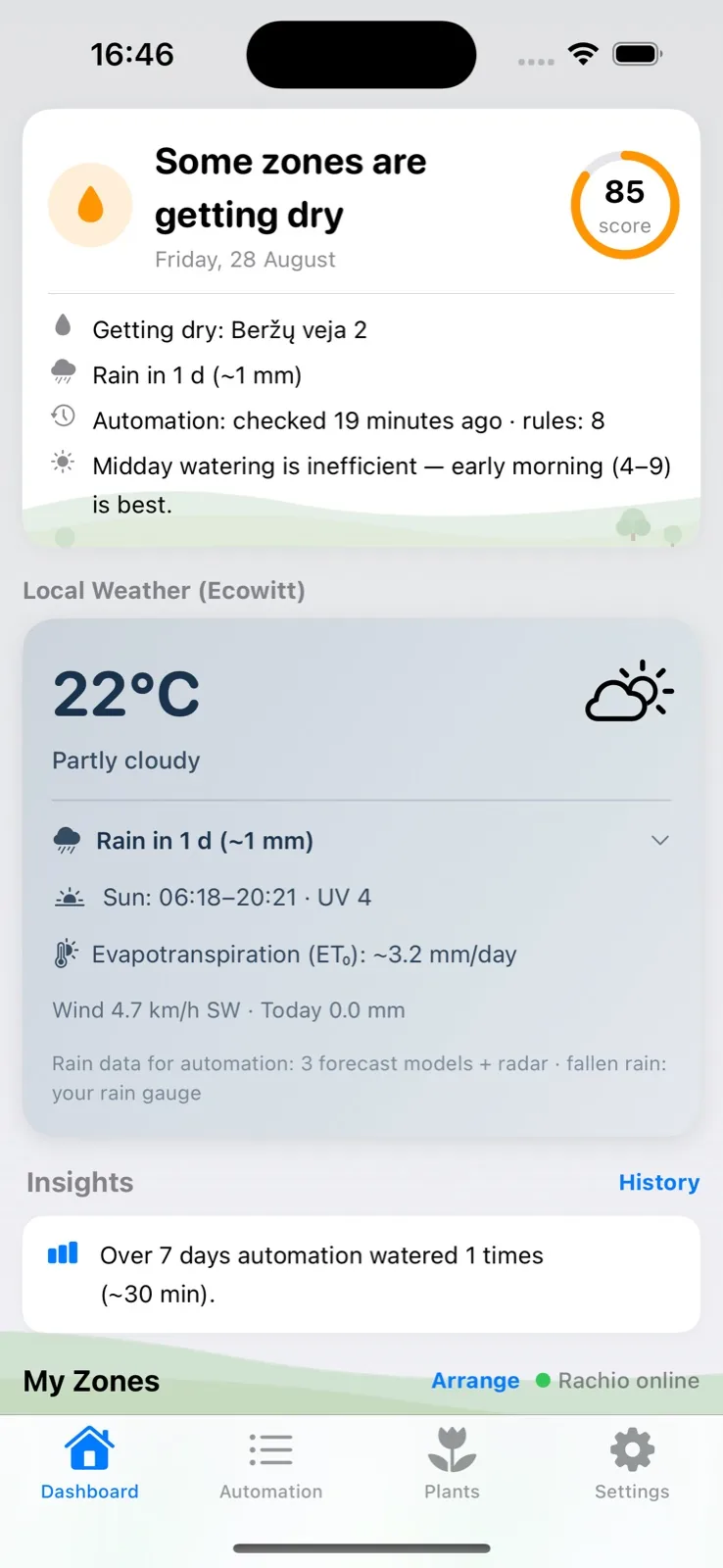
A direct reading from the Ecowitt soil sensor in your garden — not a model, not a guess. Each zone shows its sensor channel and battery voltage.
Garden score
Combines three parts: zone moisture (how many are in their optimal range), the weekly water balance and the weather forecast. The score drops as zones approach their dry threshold and recovers after rain or watering.
Evapotranspiration (ET₀)
Reference evapotranspiration — how much water evaporates from soil and plants per day. Computed with the Hargreaves formula from your location's temperatures and solar radiation.
Weekly water balance
The past 7 days of evapotranspiration minus rainfall (weather-service data, or your Ecowitt rain gauge when it reads higher). A negative balance means the garden lost more water than it received. If rain is due soon, we don't suggest watering.
Drying rate (%/day)
From 14 days of sensor history: we measure how fast moisture falls between waterings (watering and rain jumps are filtered out), then predict when a zone will hit its dry threshold.
Pot watering interval and dose
The species' base interval × season × pot type (plastic, ceramic, terracotta) × measured light. The dose is the species' recommendation for a 16 cm pot, rescaled to your pot diameter. With a pot moisture sensor attached, real moisture (25–45%) replaces the day count.
Watering verification
After every automated watering the server compares the sensor before and after: first it waits for the water to reach the sensor, then checks whether the moisture peak rose. Only if it failed to rise through both stages do you get a possible-failure alert.
FAQ
Frequently asked questions
Does the app work without sensors and controllers?
Yes. Without hardware SmartOasis is a plant assistant: catalogue, reminders, journal, diagnosis and reference guide. The garden part works on schedules without moisture sensors, and you can connect them later.
How much does it cost?
During the beta the app is free on both iPhone and Android. No ads and no trackers. Pricing after the beta will be announced in the app and here under “What's new”.
Do I need a server or a hub at home?
No. Everything works cloud-to-cloud through the manufacturers' APIs: Ecowitt, Rachio, Netro, OpenSprinkler. The rules run on the SmartOasis server in the European Union, even with your phone switched off.
Where is my data stored and who can see it?
Without an account everything stays on the phone. With an account the data lives on a server in Germany, hardware keys are encrypted, and family members only see the garden you invited them to. You can delete the account at any time in the app.
How do the iPhone and Android versions differ?
Garden, plants, automation, reference, diagnosis and family access work the same. iPhone has Siri, Live Activity and home-screen widgets; Android has an in-app language switch, with widgets on the way. Both see the same garden.
How do I join the beta?
iPhone: through the TestFlight link above, no invite needed. Android: the Google Play beta link — sign in with your Google account and the app installs like any other. Questions: info@smartoasis.app.
What's new
The beta grows every week
Updates arrive through TestFlight and Google Play — the app will tell you. The latest:
SmartOasis for Android and the Google Play betalatest
A full Android port: dashboard, zones, plants, garden, reference, diagnosis, light meter, shelf — the same app, the same garden
Sign in with Google and push notifications through Firebase; a family can be mixed — iPhone and Android
The app's language independent of the phone: Lithuanian or English
Journal export to CSV and the PDF archive now on Android too
Paused zones are visible, zone order is the family's
When a sensor does not react after watering, the server pauses the zone — the card now shows it with an orange badge and resumes with one tap
Hidden zones and zone order sync through the server: arrange on one phone, see it on all
Watering starts directly, the queue only when the controller is busy; an OpenSprinkler stop verifies the valves really closed
The “Garden” tab: outdoor plants
A catalogue of 1,169 species: trees, shrubs, flower beds, vegetables — with watering amounts in litres and advice
A plant's place = a watering zone: its sensor and automation log the watering for you
The “Garden plants” rule waters a zone by its plants' needs, with compatibility warnings for bed neighbours
Symptom wizard, remedy shelf, treatment plans
“What's wrong with the plant / lawn?” — tick symptoms, get the most likely cards
Remedy shelf: home remedies with proportions and safety notes
Treatment plan from a guide card: a spray schedule with reminders
Weather alerts: frost, heat, drought, downpour — with what to do
“This month” card: the calendar folded down to your plants
Guide, holiday mode, export
Guide: pests and diseases, lawn care, a sowing and jobs calendar by zone
Holiday mode: a caretaker page with photos, amounts and “Watered”
Export to CSV and PDF, journal up to 500 entries
Long-term charts: pots 7/30/90 d, garden zones across the season
Photo diagnosis and light meter
Diagnosis from a photo — for a plant in your collection or any other
Light meter: measured light adjusts the watering interval
Care cards for any species — even ones the catalogue never had
Watering verification without false alarms, dose sized to the pot
Care journal and Siri
“Watered”, “Fertilised”, “Repotted” — chips with a day-by-day history
“Watered” from Siri, Shortcuts and Apple Watch
Rooms and window aspects, a morning brief, a photo diary for the family
Want to try it?
SmartOasis is in public TestFlight beta. Install it in a couple of minutes: add your first plant or connect the garden.